

Table of Contents
Manufacturing Gummies Using the Melt-to-Make™ Formula Calculator App
Accurate dosing is one of the most critical aspects of producing high-quality infused gummies, and the Melt-to-Make™ Formula Calculator App was built to solve the challenges that come with it. Whether you’re formulating with cannabis, supplements, nutraceuticals, or functional mushrooms, even small calculation errors can lead to inconsistent potency, wasted ingredients, and costly production issues.
The Melt-to-Make™ Formula Calculator App simplifies how gummy formulas are calculated, scaled, and repeated—batch after batch—helping producers maintain consistency as they grow.
In this article, we’ll explain how the calculator works, why accurate formulation matters, and how the app helps producers create consistent, reliable infused gummies. You can also watch the full walkthrough video below to see the calculator in action.
Formula Calculator App How-To Video
In the video walkthrough, you’ll learn:
How to determine total batch size
How to input gummy weight and mold volume
How to enter additive potency using a COA
How to set a target mg per gummy
How the calculator automatically adjusts formulas
How to reduce waste and improve consistency
The video also demonstrates how much faster the calculator is compared to manual calculations or spreadsheets.
What Is the Melt-to-Make™ Formula Calculator App?
The Melt-to-Make™ Formula Calculator App is a purpose-built tool designed specifically for Melt-to-Make™ gummy production. Based on a few key inputs, it automatically calculates the precise amount of each ingredient needed for your batch.
The calculator is optimized for use with Melt-to-Make™ products, including:
-
Unflavored - 550kg Tote - Melt-to-Make® Pectin Gummy Base
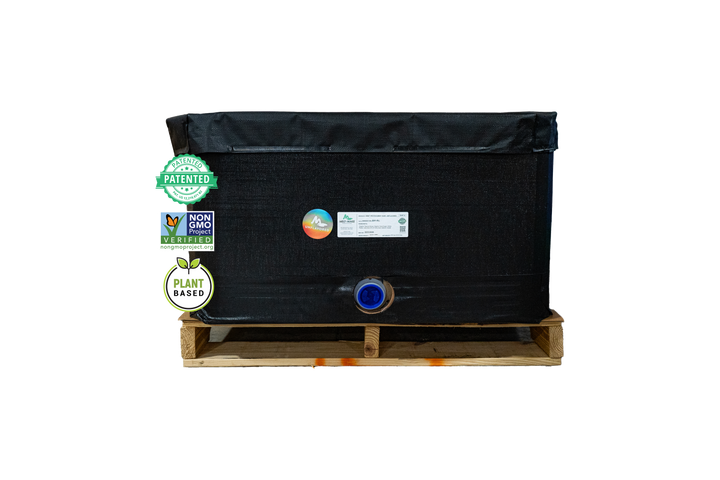
$5,500.00
Ready to bring your unique gummy vision to life? With our Unflavored Melt-to-Make® Pectin Gummy Base, creating your own signature flavors and colors has never been easier. Simplify your manufacturing process and craft all-natural gummies that are truly your own. Maximize… read more
Cost Analysis Calculator
In addition to formulation accuracy, the Melt-to-Make™ Formula Calculator App also includes a Cost Analysis Calculator. This feature helps producers understand the true cost of making gummies in-house compared to producing gummies with Melt-to-Make™.
By entering ingredient costs and labor costs, companies can see just how much they can save by using Melt-to-Make™ Gummy Bases.
This side-by-side insight allows teams to evaluate efficiency, reduce waste, and make informed decisions about scaling production. For many producers, the cost analysis highlights not only time savings, but also significant reductions in labor, material loss, and operational complexity when using Melt-to-Make™.
The result is clearer visibility into production economics—and a more confident path toward consistent, scalable gummy manufacturing.
Why Accurate Gummy Calculations Matter
Gummy infusion is more than simply mixing ingredients together. Producers must carefully account for:
Target dosage per gummy (mg per piece)
Total batch size and yield
Potency of active ingredients
Gummy weight and mold size
Expected production loss and waste
Relying on manual math or spreadsheets increases the risk of error—especially when formulas change or batches scale. A dedicated calculator removes the guesswork and helps ensure consistency across every run.
How the Formula Calculator Works
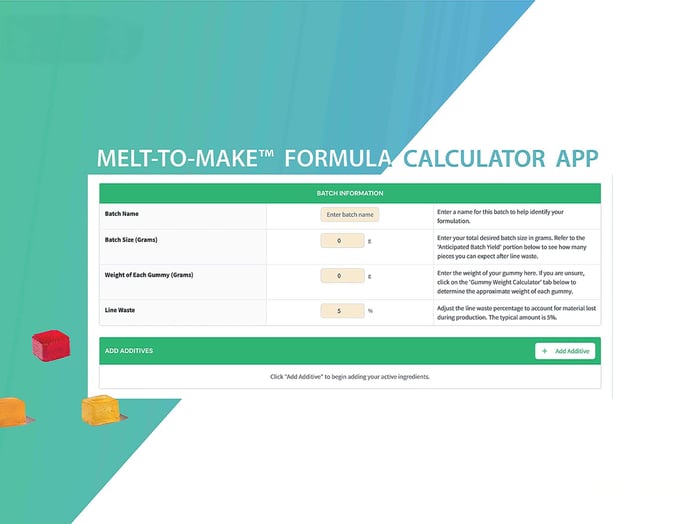
1. Confirm Gummy Weight
If you haven’t determined gummy weight yet, the app includes a built-in Gummy Weight Calculator. By entering your mold cavity size (mL or cc), the calculator estimates gummy weight for use in your formulation.
2. Enter Your Batch Size
Start by entering how many gummies you plan to produce.
For example, producing 1,000 gummies at 2.7 g each requires 2,700 g of base material. Adding a recommended 5% waste buffer brings the total batch size to 2,835g.
3. Enter Additive Potency
Next, input the potency percentage of your additive using lab-verified data from your Certificate of Analysis (COA).
Using real potency values ensures accurate dosing in the final product.
4. Set Your Target Dosage
Enter your desired milligrams per gummy. If multiple additives are used, repeat this step for each one—the calculator automatically accounts for them all.
5. Adding Bulk Flavors, Flavor Enhancers, or All-Natural Colors
If you’re using Melt-to-Make™ Unflavored Gummy Bases or looking to spice up one of our classic flavors, the Formula Calculator allows you to easily incorporate Bulk Flavors, Flavor Enhancers, and All-Natural Colors into your formulation.
Simply enter the desired usage rates, and the calculator will automatically adjust the base quantities to account for each addition. This ensures balanced flavor, accurate color concentration, and consistent texture—without the need for manual recalculations.
The Result: Accurate, Scalable Formulas
Once all inputs are entered, the calculator does the rest. It provides:
The exact amount of bulk gummy base required
The precise amount of each additive
A scalable formula you can reuse for future batches
This makes it easy to move from test batches to full-scale production without recalculating formulas from scratch.
Who Should Use the Formula Calculator App?
The Melt-to-Make™ Formula Calculator App is ideal for:
Cannabis and hemp gummy producers
Supplement and nutraceutical manufacturers
Functional mushroom brands
R&D and product development teams
Production and operations managers
If you’re currently relying on spreadsheets or manual calculations, this tool offers a faster, more reliable alternative.
FAQs
What is the Melt-to-Make™ Formula Calculator App?
The Melt-to-Make™ Formula Calculator App is a formulation and cost-analysis tool designed specifically for producing infused gummies with Melt-to-Make™ gummy bases. It helps manufacturers calculate accurate batch sizes, dosing, ingredient quantities, and production costs for consistent, scalable gummy production.
Who is the Formula Calculator App designed for?
The calculator is built for:
Cannabis and hemp gummy manufacturers
Supplement and nutraceutical producers
Functional mushroom brands
R&D and product development teams
Production and operations managers
It is especially useful for companies scaling production or transitioning from manual calculations or spreadsheets.
How does the calculator help with accurate gummy dosing?
The calculator uses real input data—such as gummy weight, batch size, additive potency from a COA, and target mg per gummy—to automatically calculate precise ingredient quantities. This reduces dosing errors, improves consistency, and helps ensure compliance and product reliability.
How does the calculator account for gummy weight and mold size?
The app includes a built-in Gummy Weight Calculator. By entering mold cavity volume (in mL or cc), users can estimate gummy weight and use that value to build accurate formulations, even before production testing begins.
Can I add flavors and colors using the Formula Calculator App?
Yes. When using Melt-to-Make™ Unflavored Gummy Bases, the calculator allows you to add Bulk Flavors, Flavor Enhancers, and All-Natural Colors. The app automatically adjusts base quantities to maintain proper ratios throughout your batch.
What is the Cost Analysis Calculator and how does it work?
The Cost Analysis Calculator helps companies understand the true cost of producing gummies. By entering ingredient costs, batch size, and yield, users can calculate cost per batch and cost per gummy. It also allows manufacturers to compare the cost of traditional gummy production versus using Melt-to-Make™.
How does the cost analysis help manufacturers?
The cost analysis feature helps manufacturers:
Compare in-house production costs vs. Melt-to-Make™
Identify savings from reduced labor and waste
Make informed decisions about scaling production
Improve margins and operational efficiency
This insight is especially valuable for teams evaluating process changes or new production methods.
Is the Melt-to-Make™ Formula Calculator better than spreadsheets?
For most producers, yes. Manual spreadsheets increase the risk of errors, especially when formulas change or multiple additives are involved. The Formula Calculator App automates calculations, reduces mistakes, and creates repeatable formulas that can be reused across batches.
Where can I see the Formula Calculator App in action?
You can watch a full walkthrough of the Melt-to-Make™ Formula Calculator App here:
👉 https://www.youtube.com/watch?v=YVel7Yjn9dE